
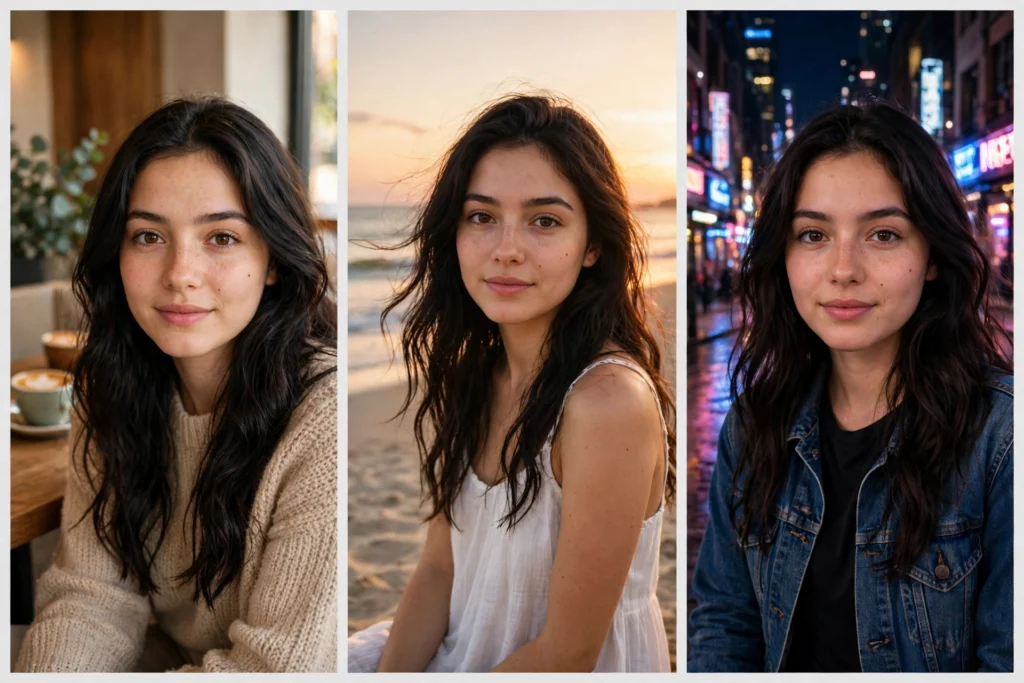
You create one AI photo of yourself and it looks perfect. You make a second one — different outfit, different place — and suddenly the face has changed. The nose is different, the eyes have shifted, it looks like a cousin, not you.
This problem is called face drift, and it is the most common frustration for anyone making a series of AI photos: matching profile pictures, a travel photo set, or a story told across several images. The fix is a technique called a character consistency prompt — one reusable description block that locks your character’s identity while everything else changes. Here is exactly how to do it in Gemini and ChatGPT.
Why AI Keeps Changing Your Face
When you write a fresh prompt, the AI invents a face from your words. Words like “young woman with long hair” match millions of possible faces, so every generation rolls the dice again. Short, vague descriptions drift the most. The solution is to stop re-describing the person from memory each time, and instead give the AI two anchors: a reference photo (when the tool allows uploads) and a fixed written description that never changes between prompts.
The Character-Lock Method: One Fixed Description Block
Write one paragraph that describes the person in precise, permanent details — and paste it, unchanged, at the start of every prompt in the series. A good character-lock block includes:
- Age and face: “a woman in her late 20s with an oval face, warm brown eyes and a soft natural smile”
- Hair anchor: “long dark brown wavy hair, parted in the middle, falling past her shoulders”
- Signature details: one or two things that never change — a small mole, eyebrow shape, a favourite necklace
- Skin and style: “natural skin texture, light natural makeup, photorealistic”
Then, after the locked block, add only what changes in this photo: the outfit, the place, the pose, the light. This single habit — same block, new scene — is the heart of every character consistency prompt that actually works.
Step by Step in Gemini (With a Reference Photo)
- Open Gemini and upload your clearest front-facing photo — good light, no sunglasses, no heavy filter.
- Start your prompt with a clear instruction: “Keep the exact same person and face from my photo, do not change her facial features.”
- Paste your character-lock block right after it, as a second anchor.
- Describe only the new scene: “Change the location to a beach at sunset, she is wearing a white summer dress, candid laughing pose, golden hour light.”
- Generate. If the face drifts slightly, regenerate before changing anything else — and never edit more than one element at a time.
This reference-photo workflow is exactly why Gemini’s image editing became famous under the Nano Banana trend. You can see it in action across our Nano Banana prompts collection, where the same person appears in completely new scenes.
Step by Step in ChatGPT (Same Workflow, Small Quirks)
- Upload your reference photo in a new ChatGPT chat, and in your first message, ask it to keep the same person in every image in this conversation.
- Paste your character-lock block and your first scene description together.
- For each next photo, stay in the same chat — ChatGPT remembers the character better inside one conversation than across new ones.
- Ask for changes one at a time: “Same person, same face — now change only the outfit to a red traditional dress.” Small steps keep identity stable; big rewrites break it.
For ready-made examples of prompts built this way, browse our Gemini prompts and AI image prompts libraries and notice how the person description stays fixed while scenes change.
Keep Outfit, Hair and Style Anchors Consistent Across a Series
Face is not the only thing that drifts. Decide in advance which elements are anchors (never change: hair length and colour, signature jewellery, makeup level) and which are variables (outfit, background, pose). Write your anchors into the lock block and repeat them even when they feel obvious. If one photo in the series must change an anchor — for example, a hairstyle change for a story — change only that one element and keep every other anchor word-for-word identical.
Fixing Face Drift: Troubleshooting
- Face looks like a different person: your description was too vague. Add two more permanent details to the lock block and use a clearer reference photo.
- Face is close but “off”: you changed too many things at once. Go back to the last good image and change one element only.
- Only one photo in the set drifts: regenerate that single photo with the exact same prompt — do not rewrite the whole block.
- Features melt in group/couple photos: describe each person with their own mini lock block, clearly separated (“Person 1: … Person 2: …”), and keep poses simple.
- Results get worse the longer the series runs: start a fresh chat, re-upload the best photo so far as the new reference, and paste the same lock block.
Best Uses for Consistent Characters
Once your character stays stable, a whole set of ideas opens up: a couple photo series with the same two people in different cities, matching profile pictures in several styles, a visual story told across five or six images, or a full seasonal set — same person, spring to winter. Creators use consistency to build a recognisable face for their page, so followers spot their photos instantly in the feed.
The method is simple, but it is a discipline: one reference photo, one locked description block, one change at a time. Follow those three rules and your AI photo series will finally look like one person living one story — not six strangers wearing the same clothes.
Frequently Asked Questions
What is a character consistency prompt?
It is a prompt built around a fixed, reusable description of a person — face, hair, signature details — that you paste unchanged into every prompt of a series, so the AI keeps generating the same character.
Which is better for keeping the same face, Gemini or ChatGPT?
Gemini is currently the strongest when you upload your own photo and ask for scene changes. ChatGPT also works well if you stay in one chat and change one element at a time.
Why does the face still change a little even with a lock block?
These tools regenerate the whole image each time, so tiny variations are normal. A clear reference photo plus a detailed lock block keeps the variation small enough that the person stays recognisable.
Can I keep two people consistent in couple photos?
Yes — give each person their own short lock block, label them clearly (Person 1 / Person 2), use simple poses, and change one element at a time.