
10 Claude prompts to work smarter, not harder — plan your day, automate repeats, and finish more with less stress.
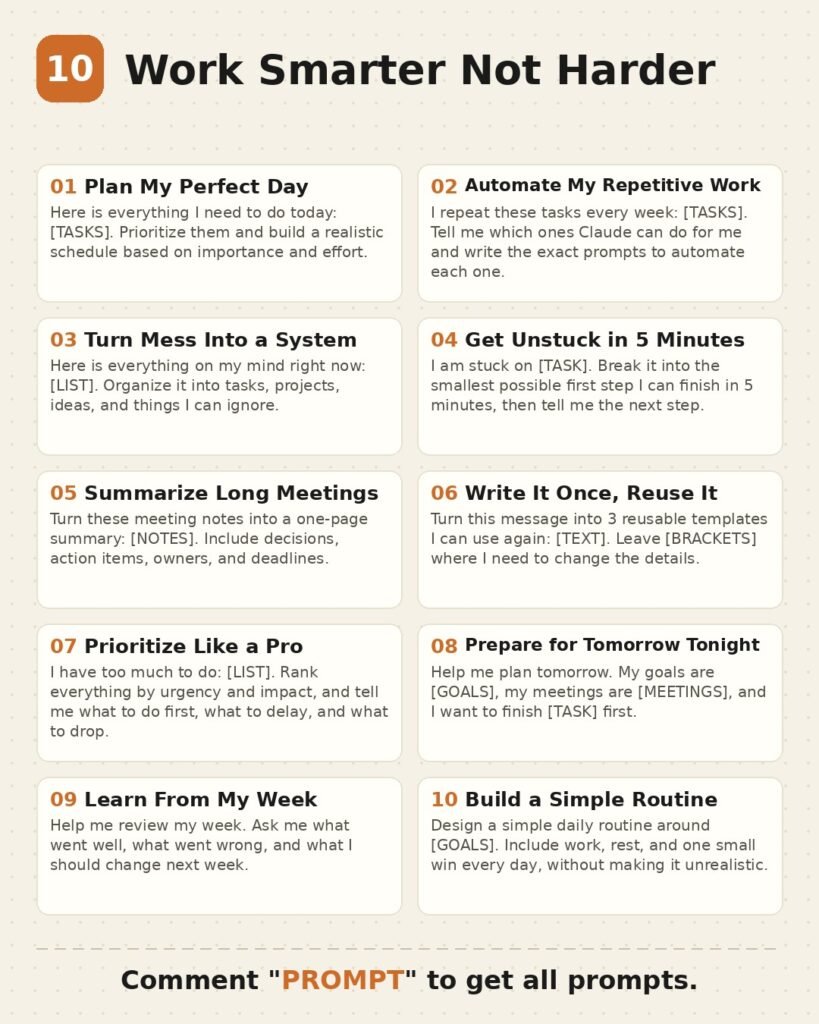
01. Plan My Perfect Day — Here is everything I need to do today: [TASKS]. Prioritize them and build a realistic schedule based on importance and effort.
02. Automate My Repetitive Work — I repeat these tasks every week: [TASKS]. Tell me which ones Claude can do for me and write the exact prompts to automate each one.
03. Turn Mess Into a System — Here is everything on my mind right now: [LIST]. Organize it into tasks, projects, ideas, and things I can ignore.
04. Get Unstuck in 5 Minutes — I am stuck on [TASK]. Break it into the smallest possible first step I can finish in 5 minutes, then tell me the next step.
05. Summarize Long Meetings — Turn these meeting notes into a one-page summary: [NOTES]. Include decisions, action items, owners, and deadlines.
06. Write It Once, Reuse It — Turn this message into 3 reusable templates I can use again: [TEXT]. Leave [BRACKETS] where I need to change the details.
07. Prioritize Like a Pro — I have too much to do: [LIST]. Rank everything by urgency and impact, and tell me what to do first, what to delay, and what to drop.
08. Prepare for Tomorrow Tonight — Help me plan tomorrow. My goals are [GOALS], my meetings are [MEETINGS], and I want to finish [TASK] first.
09. Learn From My Week — Help me review my week. Ask me what went well, what went wrong, and what I should change next week.
10. Build a Simple Routine — Design a simple daily routine around [GOALS]. Include work, rest, and one small win every day, without making it unrealistic.
How to Use This Prompt
- Copy the AI prompt from the prompt box above.
- Open Claude.
- Upload your reference photos if needed.
- Paste the copied prompt into the AI tool.
- Generate your result instantly.
Make it yours: Enhance this prompt or turn your result into a pin with the Pinterest Pin Maker.
Working harder is not the answer — working smarter is. These 10 Claude prompts help you plan your day, automate repetitive work, get unstuck fast, and build simple routines that actually stick.
How to use it — Step 1: Pick a prompt from the list below that matches what you need. Step 2: Copy the full prompt text. Step 3: Paste it into Claude and replace everything in [BRACKETS] with your own details. Step 4: Send it and use Claude’s answer — ask follow-up questions if you want it refined further.
Want more? Browse all our Claude prompts — free and ready to copy.