
10 Claude prompts every beginner should know — start from zero and use Claude like a pro from day one.
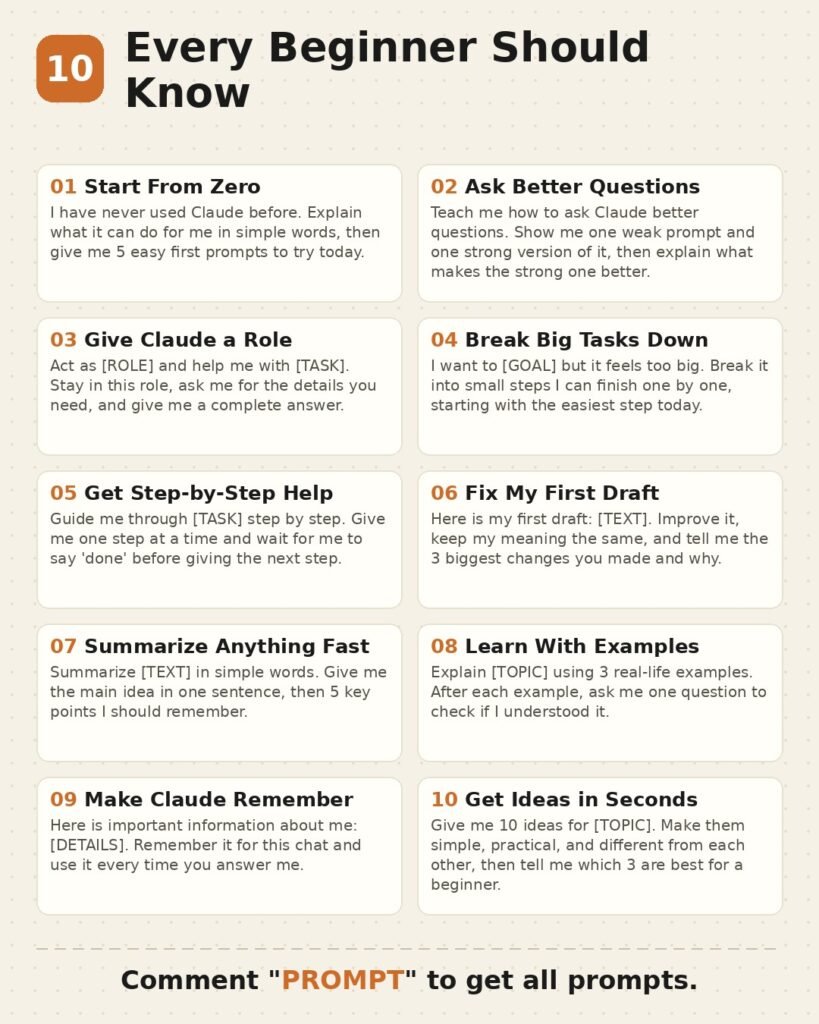
01. Start From Zero — I have never used Claude before. Explain what it can do for me in simple words, then give me 5 easy first prompts to try today.
02. Ask Better Questions — Teach me how to ask Claude better questions. Show me one weak prompt and one strong version of it, then explain what makes the strong one better.
03. Give Claude a Role — Act as [ROLE] and help me with [TASK]. Stay in this role, ask me for the details you need, and give me a complete answer.
04. Break Big Tasks Down — I want to [GOAL] but it feels too big. Break it into small steps I can finish one by one, starting with the easiest step today.
05. Get Step-by-Step Help — Guide me through [TASK] step by step. Give me one step at a time and wait for me to say 'done' before giving the next step.
06. Fix My First Draft — Here is my first draft: [TEXT]. Improve it, keep my meaning the same, and tell me the 3 biggest changes you made and why.
07. Summarize Anything Fast — Summarize [TEXT] in simple words. Give me the main idea in one sentence, then 5 key points I should remember.
08. Learn With Examples — Explain [TOPIC] using 3 real-life examples. After each example, ask me one question to check if I understood it.
09. Make Claude Remember — Here is important information about me: [DETAILS]. Remember it for this chat and use it every time you answer me.
10. Get Ideas in Seconds — Give me 10 ideas for [TOPIC]. Make them simple, practical, and different from each other, then tell me which 3 are best for a beginner.
How to Use This Prompt
- Copy the AI prompt from the prompt box above.
- Open Claude.
- Upload your reference photos if needed.
- Paste the copied prompt into the AI tool.
- Generate your result instantly.
Make it yours: Enhance this prompt or turn your result into a pin with the Pinterest Pin Maker.
If you have never used Claude before, these 10 prompts are the perfect place to start. Each one teaches you a basic skill — asking better questions, giving Claude a role, breaking big tasks down — so you go from confused beginner to confident user in a single day.
How to use it — Step 1: Pick a prompt from the list below that matches what you need. Step 2: Copy the full prompt text. Step 3: Paste it into Claude and replace everything in [BRACKETS] with your own details. Step 4: Send it and use Claude’s answer — ask follow-up questions if you want it refined further.
Want more? Browse all our Claude prompts — free and ready to copy.